Blog
By
Nelson Uzenabor

At 11 p.m., your team is offline, but your customers aren't. A buyer is stuck on checkout, a trial user can't find the right plan detail, and an existing customer wants to change billing before morning. If the only thing they see is a contact form or a “we'll reply tomorrow” message, that isn't support. It's a delay.
For most SMBs, 24/7 customer support isn't a staffing problem first. It's a design problem. The teams that make it work don't start by hiring a night shift. They build a response system that answers simple questions instantly, handles routine conversations consistently, and knows when to bring in a human.
Table of Contents
What 24/7 Customer Support Really Means for Your Business
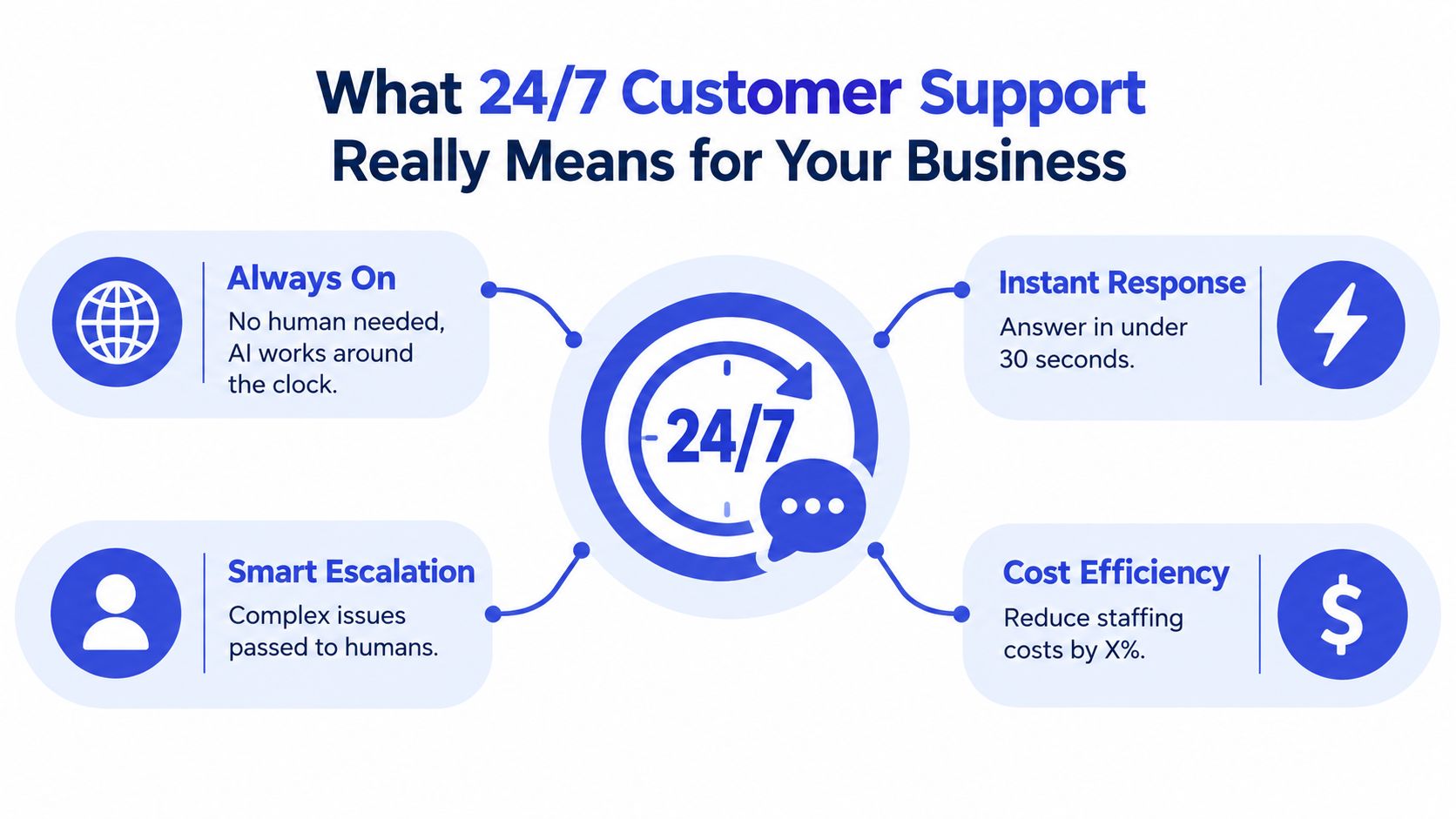
A working 24/7 setup solves the first half-minute well. Someone opens chat late at night, asks a real question, and gets a useful answer fast enough that they stay engaged. That answer might come from a help article, an AI agent, or a prebuilt workflow. What matters is that the customer doesn't hit a dead end.
The three layers that make it work
In practice, always-on support usually has three tiers.
Self-service first: Clear FAQ pages, shipping details, return policies, account instructions, and troubleshooting steps need to be easy to find.
AI-handled conversations next: The agent should answer common questions, ask follow-up questions when context is missing, and collect details before a handoff.
Human escalation last: Complex issues need a clean route to a person, with the conversation history attached so the customer doesn't repeat everything.
That's why I treat 24/7 support as an operating model, not a promise on a homepage banner.
Practical rule: If your system can't answer, acknowledge, or escalate within the customer's expected time window, you don't have 24/7 support. You have 24/7 intake.
What customers actually experience
“Always on” has to mean three things at once:
A visible support entry point on the pages where customers get stuck.
A consistent answer to routine questions, regardless of hour or channel.
A trustworthy path to a person when the issue involves billing, policy exceptions, frustration, or anything high-stakes.
A lot of teams skip that third piece. They add a bot, publish “24/7 support,” and assume the problem is solved. It isn't. Customers notice very quickly when the bot can answer product FAQs but falls apart on order changes, refunds, or account access.
If you're comparing delivery options, this breakdown of a competitive edge with CallZent is useful because it frames around-the-clock service as a practical business capability rather than a branding slogan.
Why Customers Now Expect Instant Help at Any Hour
The expectation shift is already here. A 2026 industry summary reports that 74% of consumers expect customer service to be available around the clock, and 88% expect faster responses than they did one year earlier. The same summary says 69% believe customer-service expectations are rising year over year, while 89% rate speed of response and 89% rate speed of resolution as important parts of the experience. It also notes that 37% expect to reach the same representative across channels. Those figures are collected in Nextiva's customer service statistics roundup.
Availability alone no longer carries much value. Customers judge the experience by how quickly they get a useful answer and whether the answer stays consistent when they switch channels.
Speed expectations are tighter than many teams assume
Older benchmark data helps explain why late-night support now feels urgent instead of optional. In one customer wait-time survey, 94% of shoppers expected an email reply within 24 hours, 48% within 6 hours, and 15% within 60 minutes. For live chat, 96% expected a response within 5 minutes and 80% wanted it within 2 minutes. For phone support, 90% said they would wait no more than 5 minutes to speak with a live agent, while 60% would tolerate 2 minutes or less. Earlier omnichannel research also found that 59% expected resolution within 30 minutes by phone, 52% expected resolution within a day via social media, and 75% expected resolution within a day via email, as summarized in Aircall's wait-time infographic research.
That's the pressure behind 24/7 customer support. Customers don't separate “after hours” from “normal hours” nearly as much as support teams do.
Customer expectations vs reality for 24/7 support
Expectation | What SMBs Typically Deliver | Gap |
|---|---|---|
Immediate access to help at any hour | A chat widget that captures messages but doesn't resolve much overnight | Customers wanted help, not a queue |
Fast answers on chat | Generic fallback responses or delayed human follow-up | Response speed feels slow even if the form submitted correctly |
Consistency across channels | Separate inboxes, separate tools, and missing context | Customers repeat themselves |
Clear resolution path | “We'll get back to you tomorrow” | The issue remains open during the most frustrating moment |
Customers don't care whether the answer comes from a person or a system first. They care whether the answer helps right now.
For SMBs, every unanswered off-hours question creates friction in two places. Buyers leave before purchasing, and existing customers start the next interaction already annoyed. That's why the right question isn't “Are we open all night?” It's “What do different customers need us to do at different hours?”
Choosing Your Coverage Model
There are three realistic ways to build 24/7 customer support. Teams don't need all-human coverage, and very few should rely on automation alone.
Humans only
This model uses in-house night coverage, follow-the-sun staffing, or contractors handling calls and chats after hours. It gives you the most nuance. A skilled human can calm an angry customer, interpret messy edge cases, and make judgment calls that a bot shouldn't.
The downside is sustainability. For a growing SMB, overnight staffing gets expensive fast, and manager attention gets pulled into scheduling, QA, and handoffs instead of process improvement.
If you run a field service or local operator model, this guide to solo contractor call handling is a practical reference because it shows how after-hours coverage changes when one person can't answer everything live.
Automation only
This is the cheapest option to launch. It works best when your support volume is dominated by repeatable questions like shipping windows, onboarding steps, password help, appointment policies, or plan comparisons.
It breaks the moment customers need discretion. Billing disputes, cancellation exceptions, damaged orders, emotionally tense complaints, and account changes expose every weakness in a bot-only setup.
A second issue is trust. Gartner-reported survey data from 2026 found that 87% of customers want access to a human agent when companies use generative AI in customer service, and customer chatbot usage had stayed statistically flat since 2022 despite major investment, as covered by Outsource Accelerator's summary of the Gartner finding.
Hybrid coverage
For most SMBs, hybrid is the durable model. The AI handles tier-one volume all day and all night. Humans step in for exceptions, sensitive issues, and anything that crosses a risk threshold.
That model also fits how customers move across channels. Omnichannel support research reports that 76% of customers use more than one channel in a single support interaction, and that omnichannel programs retain 89% of customers versus 33% for single-channel setups. The same research notes an economic reason to route routine issues toward self-service first, since self-service contacts can cost about $0.10 each compared with roughly $8 to $12 for phone contacts. It also warns that 69% of customers expect prior-channel context to be available immediately, while only 35% of organizations report fully connected cross-channel experiences, according to Stealth Agents' omnichannel support statistics summary.
Coverage models compared for 24/7 customer support
Model | Best For | Cost per Ticket | Coverage Gap | Handles Complex Issues |
|---|---|---|---|---|
Humans only | High-touch support with complex products or sensitive workflows | Higher, especially when human time is the default path | Staffing gaps, handoff delays, overnight strain | Yes |
Automation only | FAQ-heavy businesses with simple repeatable requests | Lower on routine interactions | Weak on exceptions, edge cases, and emotional situations | No, not reliably |
Hybrid | Growing SMBs that need speed without full overnight staffing | Mixed, with lower cost on routine volume and human cost reserved for harder cases | Depends on escalation design and ownership | Yes, when handoff is tight |
Use four filters when choosing: your ticket mix, your overnight demand pattern, your budget tolerance for after-hours staffing, and whether your issues usually require policy judgment.
Training and Deploying Your AI Support Agent
Most AI support rollouts fail for one boring reason. The bot was deployed before the team did the unglamorous work of cleaning up source content, defining intents, and deciding where the agent should stop talking.
Start with what you already have
Your best training materials are usually already inside the business. Pull from help-center articles, onboarding docs, pricing pages, return policies, shipping pages, internal troubleshooting notes, and resolved tickets that show how your team answers repetitive questions.
The goal isn't to feed the system everything. The goal is to feed it the right things in a usable format.
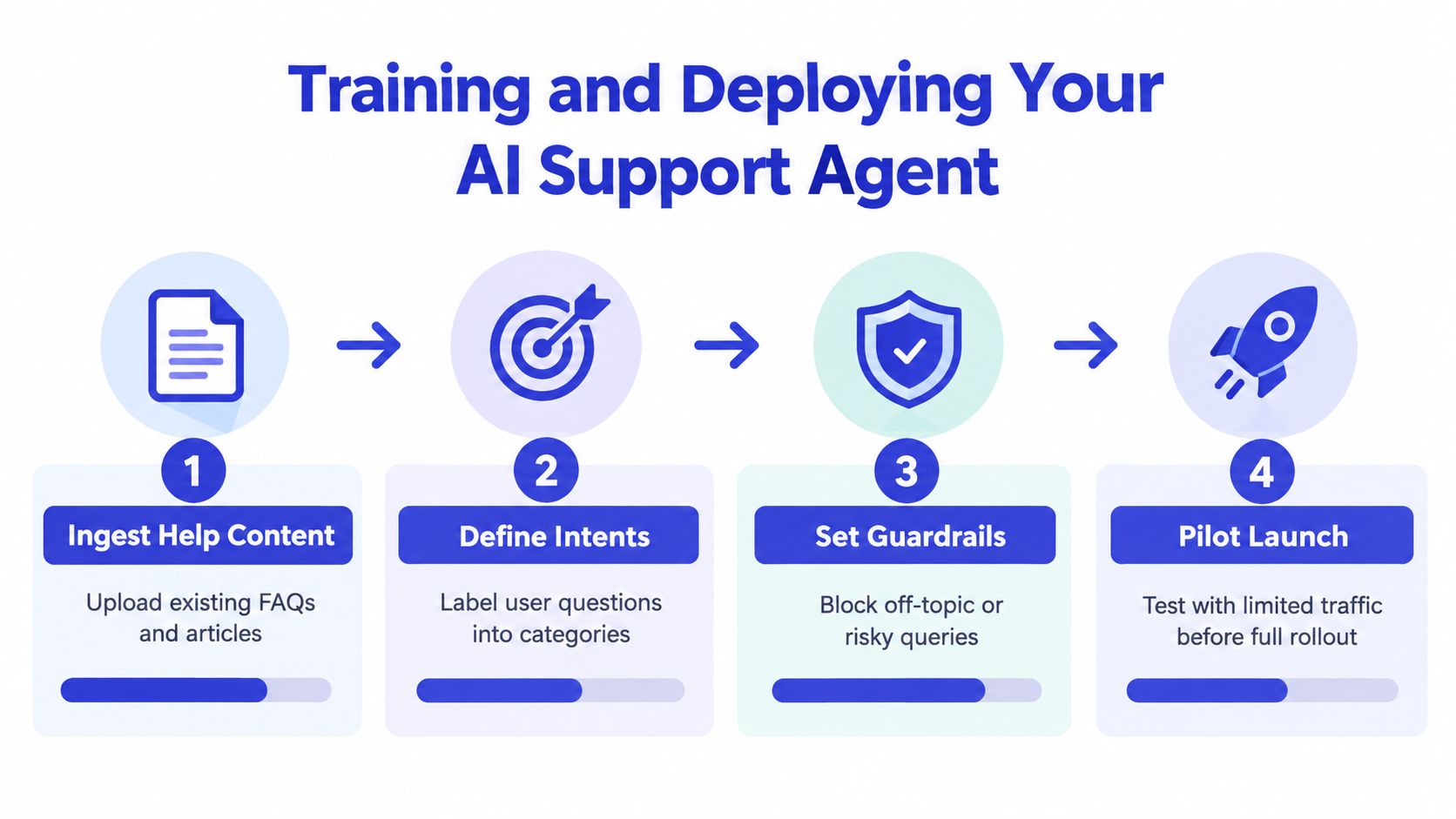
A practical workflow looks like this:
Ingest clean support content. Remove outdated policy pages, merge duplicates, and make sure the current answer exists in one place.
Define clear intents. Group questions into buckets like shipping, billing, returns, setup, cancellation, account access, and plan comparison.
Set guardrails. Decide what the AI should never improvise on, such as refunds, legal claims, pricing exceptions, or account ownership changes.
Pilot before full launch. Run the system against a limited traffic slice and compare its answers with how human agents would respond.
For teams building this process from scratch, Chatgrow is one example of a platform that lets you train an agent on site content and support material, then refine it over time. If you want a deeper walkthrough of that setup pattern, this guide on AI agent training is a useful starting point.
Define where the bot should answer and where it should stop
A support agent needs a clear line between “I can handle this” and “I should escalate this.” Without that line, you get confident but risky answers.
Field note: The fastest way to improve bot quality is to review failure transcripts weekly, not quarterly.
Useful guardrails include:
Policy-sensitive topics: Route anything involving refunds, credits, account ownership, or contract exceptions toward a human.
Low-confidence answers: If the system isn't confident, it should ask a clarifying question or hand off.
Repeated confusion: If the user asks the same thing twice in different words, stop forcing automation.
Off-topic prompts: Decline politely and redirect.
If you want to see another implementation angle, this overview of an AI customer response tool is helpful because it shows how businesses structure automated replies around recurring customer interactions.
A short product walkthrough can help teams visualize the deployment flow before launch:
Pilot in shadow mode before full exposure
Don't send full traffic to a new support agent on day one. Start with a shadow period where the AI drafts or suggests responses while a human team reviews them. Compare where the AI is strong, where it misreads intent, and where your source content is stale.
Tone also matters more than teams expect. Customers can tell when an agent sounds like generic software. Tighten the voice, simplify the sentence structure, and make sure the agent uses your actual policy language instead of vague reassurance.
Designing Smart Escalation to a Human Team
Escalation is where trust gets won or lost. A handoff that arrives with context feels smooth. A handoff that dumps a half-finished chat into a shared inbox feels like abandonment.
Set escalation triggers before you go live
Don't rely on agent instinct alone. Define the triggers that force a human route.
Escalation triggers and routing actions
Trigger | Handoff Payload | Routing Action |
|---|---|---|
Low answer confidence | User ID, transcript, AI summary, source attempted | Send to queue for manual review |
Negative sentiment or visible frustration | Conversation history, flagged sentiment shift, last bot response | Route to highest-priority human queue |
Repeat clarification request | Full transcript and unanswered question | Assign to available human during current support window |
Billing or account-change request | Customer identity details, requested action, attachments | Route to billing or account operations queue |
Explicit request for a person | Transcript, customer details, topic summary | Escalate immediately to human channel |
The handoff payload matters as much as the trigger. At minimum, the ticket should carry the customer identifier, full conversation history, the AI's summary of intent, what the system already tried, and any screenshots or attachments.
Route by urgency, not just by time
Most SMB teams end up with one of two patterns:
Follow-the-sun routing: Best when you already have teammates or partners across time zones.
On-call paging: Best when true emergencies are rare but can't wait until morning.
A lot of escalation pain comes from routing everything the same way. Refund requests, outage reports, checkout blockers, and product “how do I” questions shouldn't all land in one after-hours bucket.
When you build the workflow inside your support stack, the bot should create a populated ticket the moment it escalates. If you're working through what that handoff should include, this breakdown of how to escalate an issue covers the mechanics well.
The customer should never have to restate the problem just because the support system changed hands.
Measuring Whether Your 24/7 Support Is Actually Working
A green “online” badge doesn't prove anything. If the bot replies instantly but fails to resolve the issue, or if escalations disappear into a queue, your reporting will look healthy while customers get irritated.
Use SLAs that match channel reality
Benchmarking helps set sane expectations by channel. One 2026 benchmark summary says live chat best performance targets are under 30 to 40 seconds, phone answer targets are about 80% of calls within 20 seconds or an average speed of answer around 28 seconds, and email should ideally be under 1 hour for best-in-class performance, even though cross-industry averages are closer to 12 hours. The same source reports that 52% of support journeys start on one channel and end on another, which is why queue management and context preservation matter so much, according to Ringly's 24/7 customer service benchmark summary.
For a smaller team, those numbers are less about chasing perfection and more about avoiding false promises.
24/7 support KPIs and SLA tiers
KPI | Gold SLA | Silver SLA | Bronze SLA |
|---|---|---|---|
First response time | Immediate AI reply and fastest human follow-up path | Immediate AI reply and standard human queue | Immediate AI reply and next-available follow-up |
Resolution quality | Human-reviewed edge cases and highest escalation priority | Standard escalation path with documented ownership | Guided self-service first, then escalation if needed |
Escalation-to-human ratio | Lower tolerance for bot-only handling on valuable accounts | Balanced automation with selective escalation | Heavier automation for simple anonymous traffic |
CSAT by channel | Tracked separately and reviewed weekly | Tracked by channel group | Tracked at summary level if tooling is limited |
After-hours lead capture | Fast qualification and routed handoff | Qualification with business-hours follow-up | Basic capture with clear expectations |
Track trends that predict trouble
The KPIs worth watching every week are straightforward:
First-response time: Separate AI response from human follow-up.
Deflection quality: Look at what the bot resolved without creating repeat contact.
Escalation quality: Track whether escalated tickets were complete and owned.
Channel-level satisfaction: A strong email score can hide a weak live chat experience.
After-hours lead conversion: For sales-adjacent support, this is often the hidden value driver.
If your team needs a clean framework for the metrics side, this guide to customer service key performance indicators is a solid reference.
Troubleshooting Common 24/7 Support Breakdowns
Most 24/7 support programs don't fail because the idea was wrong. They fail because the operating details were left vague. The homepage says “always here to help,” but the system underneath it can't keep that promise consistently.
Failure mode one: overpromising coverage
This is the most common mistake. The site implies human availability at all hours, but after-hours escalations sit untouched until morning.
That gap hurts more than a modest promise would. Customers feel misled, especially when the bot sounds authoritative and then drops them into an overnight queue.
Fix it by tightening the promise inside the widget itself:
Be explicit about the first layer: Tell users they'll get an instant AI answer on routine questions.
Name the human path clearly: Say when a specialist will review escalated issues.
Separate urgent from non-urgent cases: Don't make every late-night request sound equally staffed.
Recent after-hours coverage data sharpens this point. One benchmark collection says only 18% of customers find a simple “we're closed” message acceptable, while 62% want at least immediate acknowledgment and 41% expect full resolution within 24 hours. That analysis also notes that 74% of consumers expect around-the-clock service and 88% expect faster responses than a year earlier, summarized in Stealth Agents' after-hours coverage statistics.
Failure mode two: dead-bot syndrome
This shows up when the bot handles the top few FAQs well, then loops, freezes, or invents weak answers on the long tail. Teams often misread this as an AI problem when it's usually a knowledge and guardrail problem.
Recovery starts with transcript review, not prompt tweaking alone.
Recovery move: Review unresolved chats every week, tag the misses by intent, and update the knowledge source before changing the agent's voice or personality.
Use a simple correction loop:
Pull failed conversations from the last review period.
Sort by pattern, such as missing policy detail, weak retrieval, poor clarifying questions, or wrong escalation timing.
Update the source content where the true answer lives.
Adjust confidence thresholds so uncertain answers escalate sooner.
Retest on similar conversations before widening traffic.
Failure mode three: ignored escalations
A handoff isn't a resolution. If escalated tickets land in a shared inbox with no owner, the system looks automated but behaves abandoned.
This is an operations problem, not a tooling problem.
Assign a named owner for each escalation class. Checkout blockers might page one person. Billing changes might route to another queue. Product break-fix issues may need a support lead or a technical on-call path. The rule is simple: every escalation path needs a destination, a response expectation, and a backup owner.
Failure mode four: stale knowledge
Support content drifts. Refund policy changes. Shipping windows change. A feature gets renamed. The bot keeps answering from last month's reality unless someone owns the updates.
The fix is procedural:
Set a review cadence: Product, support, and operations should review high-traffic answers on a regular schedule.
Version critical policies: Billing, refunds, cancellations, and delivery terms need one current source of truth.
Tie documentation updates to operational changes: If policy changes in a meeting, the support source has to change too.
A stale article is more dangerous than a missing article because it sounds credible.
Failure mode five: metric blindness
A dashboard no one reviews is decoration. Teams collect response-time charts, escalation counts, and channel reports, then never turn them into decisions.
Pick one weekly ritual and keep it alive. That might be a thirty-minute review of first-response time, unresolved after-hours chats, and the top escalation reasons. The point isn't to admire activity. The point is to catch friction before customers start feeling it at scale.
Failure modes vs. recovery steps
Failure Mode | Symptom | Recovery Step | ChatGrow Lever |
|---|---|---|---|
Overpromising coverage | Customers expect live humans overnight and feel misled | Rewrite widget messaging and define honest response tiers | After-hours messaging and routing setup |
Dead-bot syndrome | Bot answers common questions but stalls on edge cases | Review transcripts, add missing intents, tighten guardrails | Knowledge retraining and intent refinement |
Ignored escalations | Tickets sit in inboxes without ownership | Create named queues, owners, and on-call rules | Escalation workflows and notifications |
Stale knowledge | Correct answers changed but bot still serves old policy | Establish source review cadence and update process | Refresh training content and synced sources |
Metric blindness | Team collects reports but doesn't act on them | Tie one KPI review to a recurring ops meeting | Analytics dashboard and transcript review |
A 30-day rollout a small team can actually run
You don't need a huge support org to get this moving. You need a clean sequence.
Week 1 Audit current support volume by hour. Identify the most common after-hours questions. Write a short availability promise so marketing, sales, and support all describe the service the same way.
Week 2 Gather FAQs, policy pages, troubleshooting scripts, and recent tickets. Clean the duplicates and remove outdated answers. Group your common questions into a small set of clear intents.
Week 3 Deploy the AI layer on your highest-intent pages. Set confidence thresholds. Define escalation triggers and route each one to an actual owner. Turn on transcript capture from day one.
Week 4 Review response quality, escalation quality, and after-hours lead capture. Kill weak answers quickly. Expand the intents that are working. Tighten the handoff payload so humans receive useful context.
The important part is what happens after that first month. Day 31 isn't the finish line. It's the point where the system starts producing enough real conversations to improve itself, if your team keeps reviewing, correcting, and tightening the design.
Chatgrow gives SMBs a practical way to run 24/7 customer support without pretending a human is online at every hour. You can train an AI agent on your site and support content, handle routine questions instantly, and route complex issues with context when a person needs to step in. If that's the model you're building, visit Chatgrow to see how the workflow fits your existing support setup.
More articles from the chatgrow Team