Blog
By
Nelson Uzenabor

AI support agents are autonomous software systems trained on your business data to handle queries, qualify leads, and escalate complex issues without human intervention. In 2026, 82% of senior leaders said their teams had invested in AI for customer service during the prior 12 months, and 87% planned to invest in 2026.
At 2 AM on a Friday, an e-commerce owner wakes up to a queue full of messages about delayed deliveries, refund requests, and customers asking whether an order has shipped. The support team won't see those messages for hours. By then, some buyers have abandoned their carts, others have posted complaints, and the owner is choosing between answering tickets personally and protecting the weekend.
That scenario is no longer unusual. Customers expect immediate answers, while growing companies still operate with finite staffing, uneven coverage, and support knowledge scattered across help-center articles, inboxes, order systems, and internal documents. A useful customer support strategy has to account for both realities.
AI agents for support offer a practical response, but only when a company treats them as operational systems rather than decorative chat windows. A deflection bot can retrieve an FAQ. A genuine resolution agent must understand the request, access the right systems, take an approved action, and know when a person needs to step in.

Table of Contents
The Modern Support Crisis for Growing Businesses
Support volume grows faster than most founders expect. A new product, promotion, integration, or delivery issue can turn a manageable inbox into a business interruption. The problem is not just that agents need more time. Customers often need answers outside business hours, and every unanswered question sits close to a lost sale or an avoidable escalation.
Manual support also creates inconsistency. One employee may explain a refund policy clearly, while another improvises from memory. A new hire may spend much of the day searching for the correct procedure. The customer experiences those internal differences as an unreliable brand.
The queue is a symptom
A crowded ticket queue usually signals a process problem, not just a staffing problem. Repetitive questions consume the same attention as unusual cases, even though the answers already exist in your documentation. Shipping status, subscription changes, password issues, product compatibility, and pricing questions are common examples.
A basic chatbot can reduce some of that pressure by recognizing familiar phrases and returning prepared replies. That helps, but it has a ceiling. If the customer asks a follow-up question, changes the request, or needs an account-specific action, a scripted bot often stops being useful.
Practical rule: Automate the predictable work first, but design the escape route before you launch.
What support agents change
An AI agent can maintain conversation context, retrieve relevant business information, qualify a sales opportunity, and route a difficult case with a useful summary. That gives a small team broader coverage without pretending that every issue should be handled without people.
The trade-off is important. A deflection tool is easier to configure and safer when it has no system permissions. A resolution agent can create more value, but it needs carefully controlled access to customer records, order data, billing workflows, and escalation paths. The difference between the two isn't the chat interface. It's the operational authority behind it.
For a growing business, the right starting point is a narrow group of high-volume requests with clear policies. Expand only after reviewing conversations, failed answers, unnecessary escalations, and cases where the agent sounded confident but couldn't complete the requested task.
How AI Support Agents Actually Work
An AI support agent works more like a new employee with access to a well-organized knowledge base than like an old decision-tree chatbot. It interprets natural language, identifies intent, retrieves relevant information, reasons through the request, and either responds or uses an approved tool.
The quality of that process depends on the information and permissions you provide. An agent can't reliably explain a policy that your business hasn't documented, and it shouldn't be allowed to perform an action that your team can't audit.
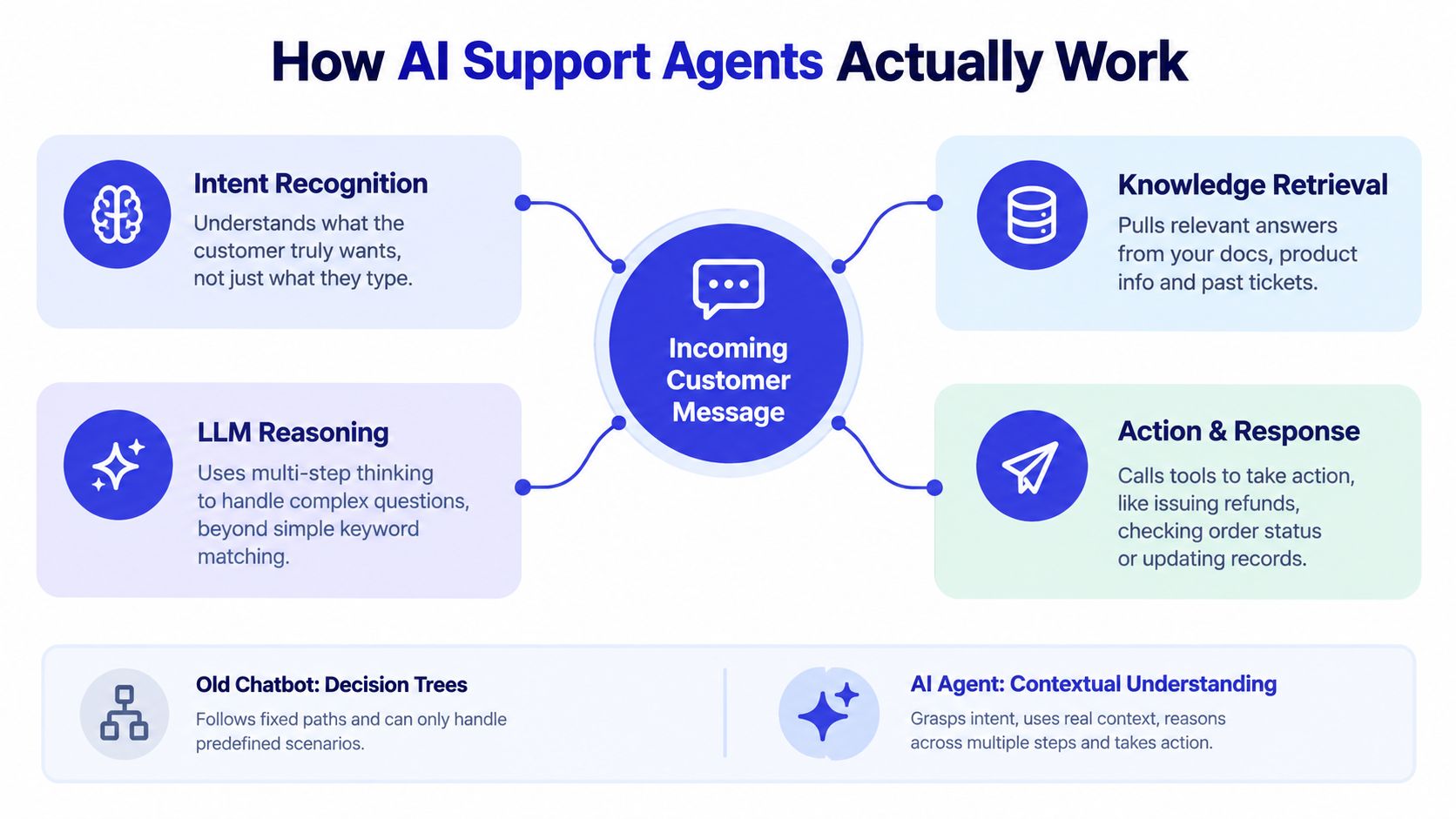
The four operating layers
Ingestion comes first. The agent receives website content, FAQs, product documentation, pricing information, policies, and other approved sources. This material becomes the reference layer for answers. Poorly structured, contradictory, or outdated content produces poor support even when the underlying language technology is capable.
Intent recognition determines what the customer is trying to accomplish. “My package hasn't arrived,” “Where is my order,” and “Can I get my money back?” may look similar to a keyword system, but they require different workflows. The agent should distinguish information requests from actions, complaints, sales questions, and requests that require identity verification.
Reasoning combines the message, conversation history, retrieved knowledge, and business rules. The agent decides whether it has enough information to answer, needs to ask a clarifying question, or should escalate. A helpful introduction to the coordination layer is this guide to agentic orchestration explained in 2026.
Action is where the integration gap appears. A text response may be enough for a general policy question. An account-specific request may require an order lookup, ticket update, billing check, or human handoff. Without those tools, the agent can only describe what someone else should do.
Context is the difference
A customer shouldn't have to repeat an order number, explain the same problem twice, or start over after escalation. The agent should preserve the relevant conversation, collect missing details, and give the receiving employee a concise account of what happened.
That is the practical distinction covered by conversational AI. The objective isn't to make the bot sound human. It's to make the interaction coherent, grounded in company information, and connected to the next useful action.
Core Features That Define Leading Solutions
A capable support agent needs more than fluent language. It needs a controlled operating model that separates what it may explain, what it may do, and what it must pass to a person.
Intent recognition that leads to a workflow
Smart intent recognition identifies the customer's goal rather than matching isolated terms. A question containing “refund” might concern eligibility, timing, a missing payment, a duplicate charge, or a request to cancel. Those intents need different answers and different permissions.
The evaluation standard should be practical. Ask whether the agent chooses the correct next step, asks for the right missing detail, and avoids making a promise your policy doesn't support. This is more valuable than judging whether the response sounds polished.
Knowledge that stays current
Continuous retraining or content synchronization helps an agent reflect changes to products, prices, shipping rules, and service policies. Treat the knowledge base as an operating asset, not a one-time upload.
Chatgrow provides one implementation example. Businesses can train an agent on website content, pricing, FAQs, and product pages, then use it for support questions and lead qualification. It also supports escalation with conversation context, so the human team receives a usable summary instead of an unexplained transfer.
Escalation that preserves trust
Smart escalation isn't a failure state. It's a designed workflow. The agent should recognize uncertainty, account-specific risk, emotional intensity, policy exceptions, and requests that require authority it doesn't have.
A strong handoff includes:
Conversation history: The employee sees what the customer asked and what the agent already answered.
Collected details: Order identifiers, account information, product names, and relevant dates are passed along where appropriate.
Reason for escalation: The team knows whether the trigger was a refund exception, low confidence, a billing issue, or a customer request for a human.
Recommended next step: The summary points the employee toward resolution instead of merely forwarding a transcript.
The investment trend supports treating these capabilities as core operations. According to Intercom's customer transformation report, 82% of senior leaders reported investment in AI for customer service during the prior 12 months, while 87% planned to invest in 2026. That adoption makes the buying standard higher. A vendor should demonstrate how its agent handles uncertainty, updates, escalation, and context, not just how quickly it produces a reply.
For a broader comparison of platforms and capabilities, see this guide to an AI customer service platform. The useful question is simple: can the system reduce repetitive work without creating a second queue of corrections?
Step-by-Step Implementation for SMBs and SaaS
Start with a contained operational problem. Don't begin by asking an agent to handle every customer conversation, every policy exception, and every internal workflow. Choose a clear set of intents where the source information is reliable and the acceptable actions are easy to define.
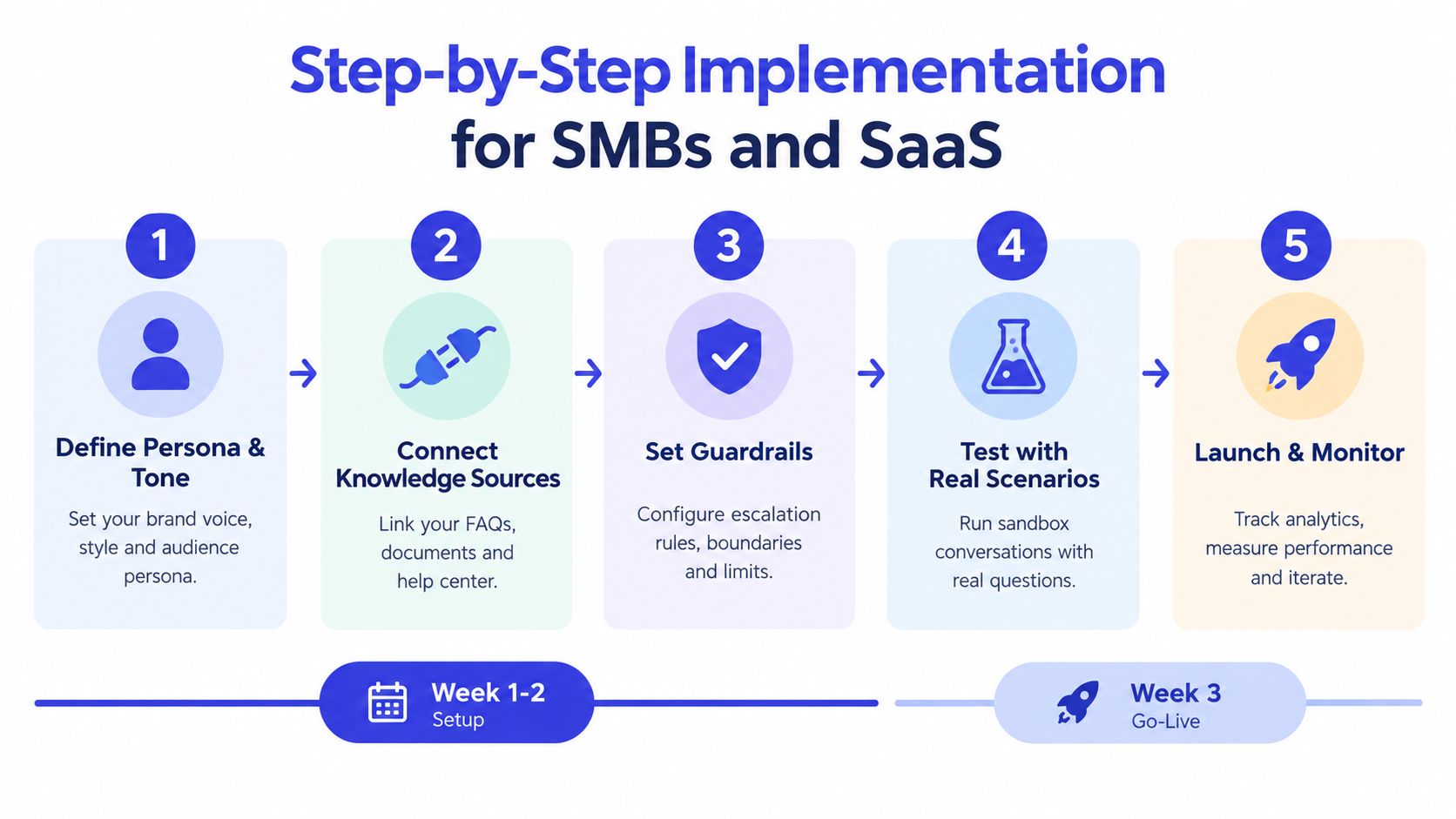
Start with boundaries, not prompts
Define the persona and tone. Write down how the agent should greet customers, explain limitations, handle frustration, and represent your brand. Specify phrases it should avoid and the point at which it should stop trying to answer.
Connect approved knowledge sources. Gather help-center articles, product pages, pricing, delivery information, refund rules, and sales qualification criteria. Remove contradictions before training. If two documents describe different cancellation policies, the agent shouldn't be expected to choose correctly.
Set guardrails and escalation rules. Decide which requests need identity checks, which actions require human approval, and which subjects should always move to a specialist. Give the agent explicit refusal behavior for unsupported requests.
Test realistic scenarios. Use actual variations, not only carefully written examples. Include misspellings, vague questions, angry customers, follow-ups, contradictory details, and requests that cross from information into action. A sandbox or trial environment gives your team room to test before exposing the workflow to customers.
Launch on high-intent pages and monitor. Place the agent where questions influence conversion or create support load, such as pricing, checkout, product, account, and help pages. Review conversations regularly and turn recurring failures into better documentation, rules, or integrations.
For SMBs and SaaS companies, one focused agent is usually better than a collection of partially configured specialists. Add separate agents only when different products, audiences, languages, or permissions justify the extra operational complexity.
A support copilot can also improve the human team's capacity. A field study found that agents using an AI tool handled 13.8% more customer inquiries per hour, with the largest gains among less-skilled and newer agents, as reported in this field analysis of AI agents in customer service.
Don't judge the launch by the first week of conversations alone. Look for repeated failure patterns, incorrect confidence, unnecessary handoffs, and questions that expose missing business documentation. Your team should own the review loop even if a vendor manages the underlying infrastructure.
Measuring ROI and Defining Success Metrics
Conversation volume is a weak success metric. An agent can handle many conversations while frustrating customers, transferring cases unnecessarily, or answering questions without resolving them. Measure the customer outcome and the operational result together.
A useful scorecard combines four views:
Area | What to measure | Why it matters |
|---|---|---|
Automation | Deflection and completed resolutions | Shows whether human workload actually changed |
Efficiency | Handling time and time to escalation | Reveals whether the agent removes work or adds review work |
Experience | CSAT, repeat contacts, and escalation sentiment | Tests whether customers felt helped |
Revenue | Qualified leads and conversion after interaction | Connects support conversations to commercial outcomes |
Calculate the real economics
The market case is strongest for repetitive, high-volume requests. A 2026 market snapshot estimated the global AI customer service market at $15.12 billion, up from $12.06 billion in 2024, with a projection of $47.82 billion by 2030 at a 25.8% CAGR. The same snapshot reported average AI support interaction costs of $0.50 to $0.70, compared with $6 to $8 for human-agent interactions. These figures come from the G2 market snapshot on AI in customer support.
Those economics don't justify automating every conversation. They justify assigning low-risk, repeatable work to software while reserving human attention for exceptions, judgment, and relationship recovery. Include integration, monitoring, maintenance, and human review in your calculation. A cheap interaction that produces a refund error isn't cheap.
Track experience, not just deflection
A customer may receive a technically correct answer and still feel ignored if the agent missed their frustration or made them repeat information. Review transcripts alongside CSAT and repeat-contact behavior. For a focused approach to tracking brand sentiment in AI conversations, examine language patterns that indicate confusion, anger, urgency, or relief.
Set a baseline before launch, then compare like-for-like intents. Separate automated answers from assisted human replies, and distinguish successful resolution from a simple transfer. Your reporting should answer one question: did the agent improve the customer journey while reducing avoidable work?
Vendor Selection and Integration Considerations
The integration gap is the deciding factor. Many agents can explain a refund policy. Far fewer can safely determine eligibility, retrieve the relevant order, update a ticket, initiate an approved action, and tell the customer what happens next.
Recent coverage from Bland.ai on AI agent challenges in customer support identifies system integration as a major source of failure. Support agents often need read and write access to CRM, ticketing, billing, identity, and timeline data before they can do more than return text.
Ask what the agent can actually do
During vendor evaluation, ask for a workflow demonstration, not a feature tour. Use a realistic case such as a delayed order, duplicate charge, plan change, or account-access issue.
Check whether the platform can:
Read the right record: Retrieve the customer, order, subscription, and previous-contact context.
Write safely: Update a ticket or trigger an approved workflow with auditability.
Respect permissions: Require verification or human approval for sensitive actions.
Escalate cleanly: Transfer the case with a summary, collected details, and reason.
Recover from failure: Explain what happens when an API is unavailable, information conflicts, or confidence is low.
Stay maintainable: Let your team update policies and knowledge without rebuilding the whole system.
Build or use a platform
A custom build makes sense when your workflows are unusually complex, your data model is distinctive, or support automation is a strategic product capability. It also creates responsibility for connectors, testing, security, monitoring, model changes, and ongoing knowledge maintenance.
A platform such as Chatgrow is more suitable when an SMB, SaaS company, or agency needs to train an agent on business content, deploy it on relevant website pages, qualify leads, and route complex conversations to people without assembling the full stack internally. The faster path is not automatically the cheaper path, so compare time to useful deployment and the staff required to maintain the system over time.
Avoid walled gardens that force manual copying between the agent and your support tools. If employees must retype customer details, verify information in separate screens, or repair every incomplete handoff, you've shifted the workload rather than removed it.
Navigating Reliability Challenges and Future Trends
Reliability remains the hard problem. A 2026 survey reported that AI-agent adoption in customer service rose from 39% to 66% in a year, while 55% of organizations cited reliability and hallucination management as their biggest challenge, according to coverage of AI agent challenges in customer support.
Use human-in-the-loop rules for sensitive actions, monitor live conversations, and test complete interactions rather than isolated answers. One benchmark used 100 held-out support questions and scored whole-conversation performance for accuracy, completeness, and helpfulness, as described in this industry evaluation paper. Teams reviewing deployment risk should also use practical agent security best practices, especially around data access, permissions, and escalation.
Chatgrow lets businesses train custom support agents on their website, pricing, FAQs, and product pages, then deploy them for instant answers, lead qualification, and context-rich human escalation. Visit Chatgrow to test a focused support workflow and decide whether it can resolve a real customer problem before expanding its scope.
More articles from the chatgrow Team