Blog
By
Nelson Uzenabor

You're watching three pre-purchase chats arrive while a refund request sits unanswered. One shopper wants to know whether the product will arrive before a birthday. Another needs help choosing the right size. The refund customer already paid, and now wants reassurance. At 10:47 a.m., the difficult part isn't typing a reply. It's deciding which conversation protects revenue first.
That's the daily reality of ecommerce customer support for a small brand. Support touches the customer before checkout, during payment, after fulfillment, and when someone wants to return or reorder. The right system helps you answer quickly without sacrificing judgment, context, or trust.
Table of Contents
What Ecommerce Customer Support Actually Means
Ecommerce customer support is the combined process of helping shoppers discover, purchase, receive, use, return, and reorder products. It includes people, workflows, helpdesk software, self-service content, live chat, messaging, and AI-assisted replies.
That definition is broader than a shared inbox. A retail customer service team might answer questions about a product or resolve a complaint. An ecommerce team also needs access to cart context, order status, payment details, shipping events, product specifications, and return eligibility. A customer asking, “Can I change my address?” needs a different answer depending on whether the order is still awaiting fulfillment or already with the carrier.
Practical rule: Treat every support conversation as part of the buying journey, not as an isolated ticket.
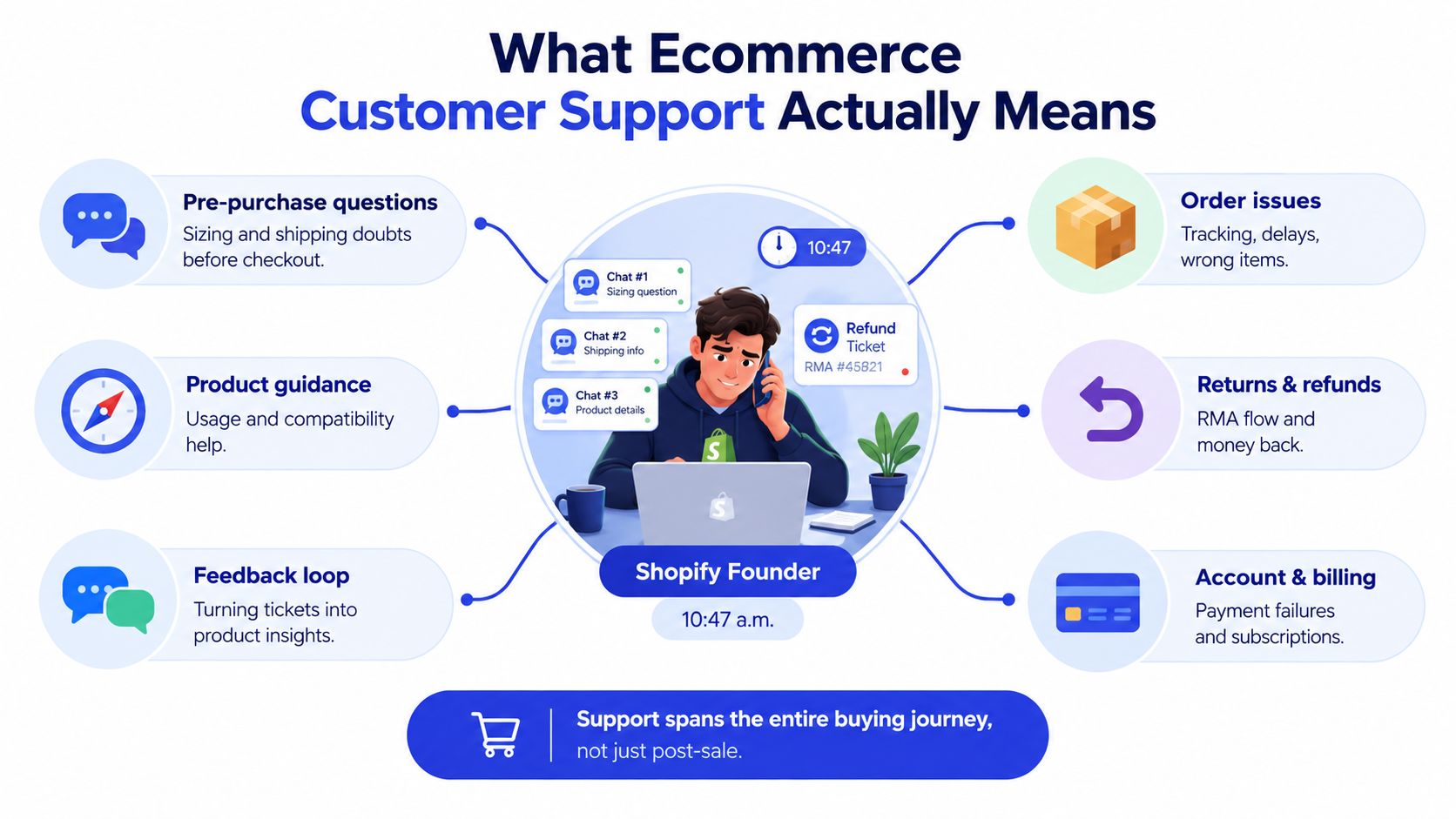
The customer's path usually contains six connected support moments:
Pre-purchase questions: Sizing, compatibility, delivery timing, and product comparisons.
Order issues: Tracking, delays, wrong items, damaged packages, and address changes.
Returns and refunds: Eligibility, return authorization, labels, exchanges, and repayment status.
Account and billing: Payment failures, subscriptions, invoices, and account access.
Product guidance: Setup, usage, care instructions, and troubleshooting.
Feedback loops: Repeated questions that reveal unclear product pages, policy gaps, or fulfillment problems.
For a small Shopify store, this means your support stack should connect the storefront, helpdesk, order system, and knowledge base. A founder can begin with a shared inbox and clear macros, then add automation when the repeated patterns are visible. Your team's operating context matters too, because a two-person brand needs different routing rules from a multi-store agency.
This guide focuses on the practical build: why support affects revenue, which channels fit which requests, which KPIs deserve attention, where AI is safe, how to escalate to humans, and how to roll out the system in 30 days.
Why Support Is Now a Revenue Function
Support affects revenue in two directions. Before checkout, a precise answer can remove hesitation. After checkout, a useful update can determine whether the customer trusts your brand enough to buy again.
The available evidence makes the commercial link clear. 95% of ecommerce professionals say strong service contributes to incremental revenue, while 89% of consumers have switched to a competitor after a poor customer experience. On the positive side, 93% are likely to make repeat purchases when companies deliver excellent customer service. These figures are reported in ecommerce customer service statistics from eDesk.
The operating implication is simple: a support reply can protect a sale, prevent a refund, or create the confidence behind a second order. That doesn't mean every ticket should become a sales pitch. It means the team should know when a question signals purchase intent and when the customer needs service recovery.
Support Touchpoint | Primary Revenue Metric | Typical SMB Benchmark |
|---|---|---|
Product question before checkout | Assisted conversion rate | Track whether conversations end in an order |
Shipping or delivery concern | Cart completion and refund avoidance | Compare outcomes for answered and unanswered conversations |
Return or exchange request | Retention and exchange rate | Measure whether the customer keeps value with the brand |
Product guidance after delivery | Repeat purchase and review sentiment | Tag follow-up orders and recurring complaints |
High-value or bulk inquiry | Qualified pipeline | Route buying signals to sales instead of a general queue |
First-contact resolution deserves particular attention. 72% of shoppers prefer to resolve issues on their first contact, according to the same eDesk source. If a customer has to repeat an order number, explain the situation twice, or wait for another team to approve a routine action, the brand adds friction at the moment trust is most fragile.
For founders, the takeaway is financial rather than cosmetic: staff time, helpdesk costs, and automation should be evaluated against conversion protection, repeat purchasing, refund prevention, and qualified sales opportunities. If you're comparing outsourced support or sales coverage, resources such as AnyBPO campaign types and metrics can help clarify which activities should be measured separately. Your pricing model should also account for the support workload created by different products, markets, and policies.
Core Channels and Where Each One Fits
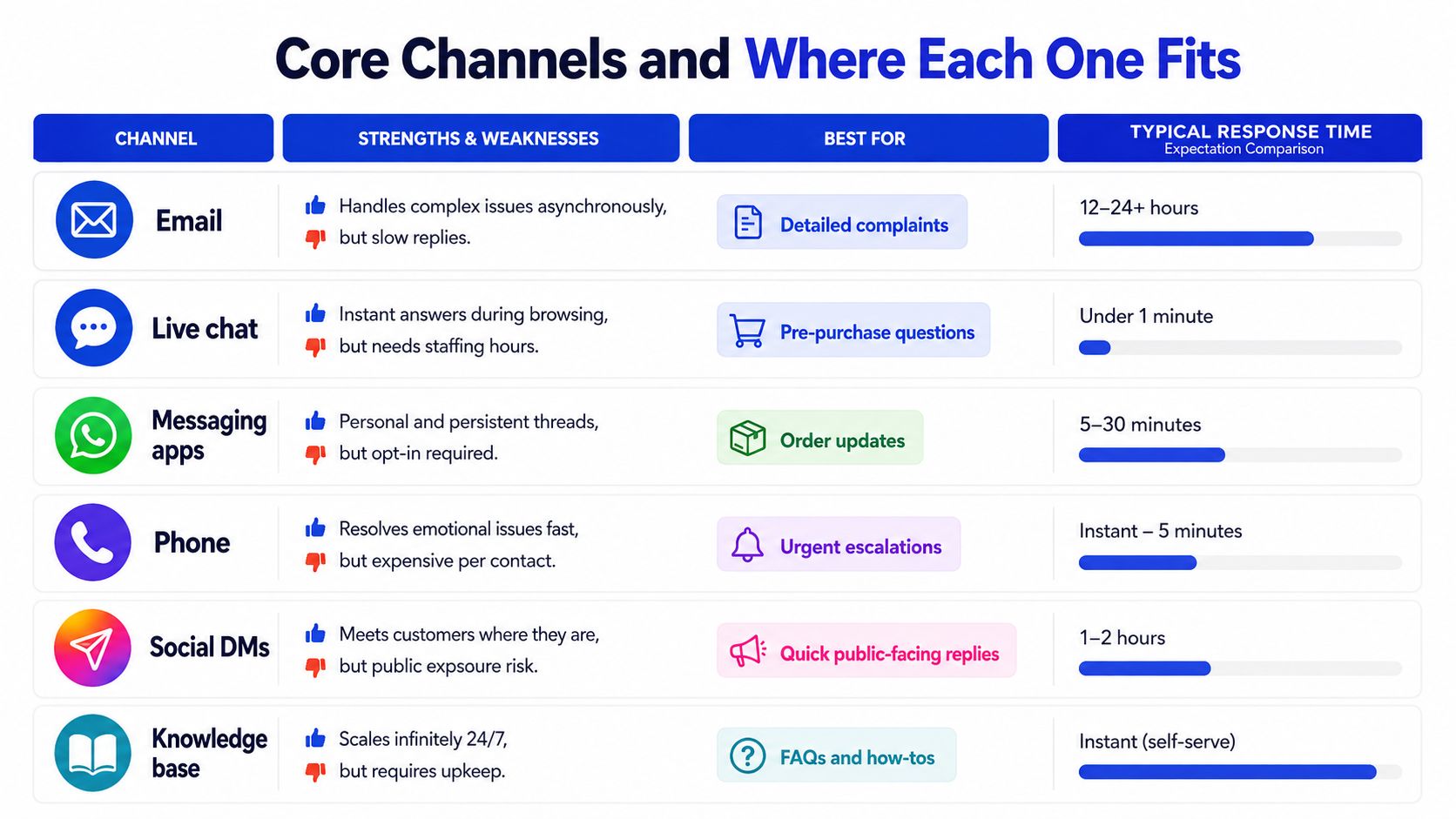
A channel is useful only when it matches the customer's urgency and the team's ability to maintain it. Opening every channel at once creates fragmented context. Start with the places customers already ask for help, then assign each channel a clear job.
Email handles detailed complaints, payment questions, warranty discussions, and cases that need attachments. It gives the customer a written record, but slow replies can make a simple issue feel abandoned. Use templates for common requests, while leaving room for a human explanation when the situation is unusual.
Live chat works best on product pages, comparison pages, and checkout-adjacent experiences. It can answer sizing, compatibility, and delivery questions while the customer is still deciding. Its weakness is coverage. If nobody is watching the queue, the chat invitation creates an expectation the team can't meet.
Messaging apps create persistent conversations that suit order updates and delivery exceptions. The customer can return to the thread without starting over. WhatsApp support grew 153% in a matched cohort, while chat grew 47%, as reported in Shopify's customer experience trends coverage. Those figures describe market coverage cited by Shopify, not a guarantee for an individual store.
Phone is a high-trust fallback for complex, emotional, or high-value cases. It can resolve confusion quickly, but it requires staffing and consistent call notes. Social DMs help brands respond where customers already communicate, although public complaints can escalate if the private reply is slow or evasive.
Self-service scales product FAQs, delivery policies, care instructions, and return rules. It works around the clock, but only when the content stays aligned with the store. For global brands, bilingual CSR roles via Virtustant Jobs can be relevant when language coverage becomes a constraint.
A practical routing rule is to consider urgency, order value, customer preference, and complexity. Don't route a delivery exception to social DMs just because that's where the complaint appeared. Pull it into the shared helpdesk, preserve the conversation, and give the customer one clear owner.
Metrics and KPIs That Drive Real Decisions
A useful support dashboard answers a question the team can act on this week. “How many tickets did we close?” is a starting point, not a strategy.
Track first response time by channel and intent. Industry ecommerce email support typically sits around 4 to 6 hours, while best-in-class teams respond in 30 to 60 minutes. Live chat leaders can respond in 12 to 30 seconds, according to customer service response-time benchmarks from Ringly. Compare your median with your busiest periods, because an acceptable average can hide a queue that fails during the hours shoppers need help.
Measure resolution time using both the median and the 90th percentile. The median shows the normal experience. The 90th percentile exposes the difficult cases that consume founder attention or create repeat contacts. Then pair those figures with CSAT, post-resolution feedback, deflection rate, chat-assisted conversion, and revenue connected to support interactions.
Use helpdesk exports rather than complex analytics at first:
First response time: Time from customer message to the first meaningful reply.
Resolution time: Time from initial contact to confirmed solution, separated by intent.
CSAT: Positive survey responses divided by completed surveys.
Deflection rate: Resolved self-service sessions divided by total self-service sessions, with repeat contacts checked separately.
Assisted conversion: Orders associated with a support conversation divided by eligible support conversations.
Revenue per interaction: Attributed order revenue divided by the support conversations included in the reporting window.
KPI | SMB Benchmark | Calculation | Action Trigger |
|---|---|---|---|
First response time | Use the channel benchmarks above as reference points | First reply timestamp minus intake timestamp | Add routing or coverage when the median rises during peak hours |
Resolution time | Compare median with the 90th percentile | Resolution timestamp minus intake timestamp | Review policy approvals and escalations when the long tail expands |
CSAT | Establish your own baseline by intent | Positive responses divided by survey responses | Inspect transcripts when CSAT falls for one channel or category |
Deflection rate | Judge quality, not volume alone | Self-service resolutions divided by self-service sessions | Rewrite content when customers return with the same question |
Assisted conversion | Measure by conversation intent | Attributed orders divided by eligible conversations | Coach product guidance when high-intent chats don't convert |
If refund volume spikes, segment by SKU, carrier, policy, and agent tag before hiring. If CSAT slips while response time improves, the team may be answering quickly but inaccurately. If response time creeps upward, fix routing and peak coverage before buying more software.
High-Impact Use Cases for AI and Automation

The safest automation targets have high volume, predictable intent, and accessible data. That makes “Where is my order?” a strong first use case. Order status, tracking events, carrier exceptions, and estimated delivery details can answer the question without sending an agent across multiple systems.
A good way to spot the right starting point is to look for the questions that repeat after purchase. Returns, refunds, exchanges, and shipping fees often dominate support for ecommerce brands, which is why post-purchase support deserves separate planning. One field study of Alibaba's Taobao marketplace found these after-sales issues made up 56.5% of customer service chats. Narvar's 2025 post-purchase report also found that 74% of US online shoppers had a late delivery in the past year, while 86% experienced at least one delivery issue, as summarized by ecommerce customer service research from Macha.
The practical rule is simple. Automate the requests that are repetitive, data-backed, and low risk. Keep a person on the line when the answer depends on judgment.
Build the workflow around these use cases:
WISMO: Pull the order, carrier event, and expected delivery date into the reply. Escalate when tracking is missing, contradictory, or past the store's exception rule.
Order edits and cancellations: Offer a self-service window before fulfillment. Close the window once the warehouse confirms dispatch.
Returns and exchanges: Check eligibility, collect the reason, generate the correct label, and explain the next step. Do not bury restrictions in a generic confirmation.
Policy FAQs: Answer shipping, sizing, warranty, and care questions from a maintained knowledge base. Product pages and support content must agree.
Human handoff: Send the transcript, customer details, order information, detected intent, and attempted actions to the agent.
For multi-marketplace teams with heavy WISMO volume, eDesk's marketplace seller benchmark reports a healthy automation rate of 50% to 65%. Treat that as a reference range, not a quota. Measure containment with repeat contact, first-contact resolution, escalation quality, and cost per ticket.
Avoid full automation for sensitive complaints, unclear legal exposure, unusual goodwill refunds, and high-value exceptions. A fast wrong answer costs more than a careful handoff.
Before choosing an AI agent or a human staffing model, compare AI-based virtual staffing against the volume, risk, and language coverage your store actually needs.
Designing the Workflow from AI Agent to Human Escalation
A reliable workflow preserves context at every stage. The customer shouldn't have to repeat the order number because a bot handed the conversation to an agent.
Start with unified intake
Connect email, website chat, social messages, and WhatsApp to one helpdesk. Capture the customer's identity, order number, page visited, previous conversations, and language preference. If the platform can't identify the customer, ask for the minimum detail needed to locate the order.
Classify before answering
The AI layer should label intent, urgency, sentiment, order state, and commercial value. A practical instruction might be: “Classify the message as tracking, return, product question, billing, complaint, or sales inquiry. Use order data when available. If confidence is low, ask one clarifying question or escalate.”
The agent can resolve routine tier-one requests when it has the required data. It should never claim that a refund was issued, a package was delivered, or an order was changed unless the connected system confirms the action.
Define explicit escalation rules
Route to a person when the message contains an ambiguous intent, negative sentiment, threats of public escalation, a sensitive payment issue, a request outside policy, or a possible safety concern. Also escalate when the customer has already contacted support and the automated reply didn't resolve the issue.
The human should receive:
Conversation history: Every message and automated action.
Order context: Status, payment state, fulfillment state, and relevant product.
Reason for escalation: The exact rule that fired.
Suggested next reply: A draft that the agent can edit.
Customer objective: Refund, replacement, delivery update, product choice, or sales consultation.
After resolution, tag the final outcome. Feed repeated unanswered questions into the knowledge base, and route bulk orders or higher-tier product interest to sales. The same workflow can be configured in Gorgias, Zendesk, HubSpot, or another tool, because the important design is the handoff logic, not the brand of software.
Real-World Examples for SMBs, SaaS, and Agencies
Consider a small apparel store with two people handling support. The team connects Shopify order data to a shared inbox and lets an AI agent handle routine tracking requests, return eligibility, and sizing questions outside working hours. The founder still reviews damaged-item complaints and unusual refunds, while the automation removes the need to search manually for every delivery status.
A subscription software storefront needs a different boundary. The chat widget can ask whether a visitor is evaluating a plan, needs help with billing, or already has an account. A high-intent buyer goes to sales with the conversation attached. An existing customer gets a billing or access workflow. The important design choice is separating commercial qualification from account support, so a sales lead doesn't disappear into a technical queue.
An agency managing several client stores can create a shared operating model without forcing every brand into identical policies. Each client gets its own product and policy knowledge, while the agency standardizes intent tags such as WISMO, return, complaint, product advice, and sales inquiry. Escalations can then be prioritized by customer risk, order value, or client-specific service rules.
For a travel or hospitality client, the same principle applies to booking changes, cancellation policies, and urgent itinerary questions. A resource such as hotelier stories can provide useful context for how service workflows differ across customer journeys.
These are operating examples, not promises of a particular performance lift. Before rollout, write down the channel mix, the automation boundary, the human owner, and the result you'll measure. That prevents a vague “AI project” from replacing a concrete support process.
A 30-Day Implementation Plan and Common Pitfalls
A small team can build the foundation in a month by limiting the first release. Don't automate every category. Start with the requests that repeat, have clear answers, and expose enough data for the system to act safely.
Week one audits the current queue
Export recent conversations and tag the top five intents. Mark the channel, order status, sentiment, outcome, and whether the customer contacted support again. Choose a helpdesk that can combine your active channels and connect to your store data.
Week two documents the answers
Write the shipping, returns, refunds, sizing, warranty, and order-status content customers need. Create five macros for the most common intents. Add ownership, approval limits, and escalation instructions to each one.
Week three launches the lowest-risk automation
Start with email or chat, depending on where your answers are clearest. Connect order lookup, configure confidence and sentiment rules, and require a human handoff for exceptions. If your team qualifies leads, send the customer's intent and transcript to the CRM or scheduling workflow.
Week four expands carefully
Add messaging and social DMs only after the first channel produces clean transcripts. Review deflection, CSAT, first response time, repeat contacts, and qualified leads each week. Remove replies that sound confident but lack evidence.
Common pitfalls are predictable:
No fallback: Customers get trapped in a loop. Add a visible human option.
Hidden escalation: Frustrated shoppers repeat themselves. Pass the full context forward.
Ignoring WISMO: Agents spend hours on status checks. Connect carrier and order data.
Support in a silo: Marketing never sees recurring objections. Share intent and product feedback.
No transcript QA: Small inaccuracies spread. Review a sample of automated conversations weekly.
The rollout test: Can a new team member understand what the automation may answer, what it must not answer, and exactly when to take over?
The aim isn't maximum automation. It's a support motion that answers routine questions quickly, gives humans the context needed for difficult cases, and shows whether conversations protect or create revenue.
Chatgrow lets businesses create, train, and deploy custom AI support agents using website content, pricing, FAQs, and product pages, with smart escalation that sends concise summaries to human teams. Visit Chatgrow to explore an ecommerce support setup that can answer common questions, qualify leads, and improve through ongoing review.
More articles from the chatgrow Team